

This post may contain affiliate links that at no additional cost to you, we may earn a small commission. Read the Disclosure Policy for more information.
Last Updated on October 3, 2026 by Katie
Pinterest is the reason this blog has readers. I don’t say that lightly, and I’ve known it for a long time.
The proof is in my Analytics. Over the last 28 days, Pinterest sent me around 11,000 visits.
Google sent 656.
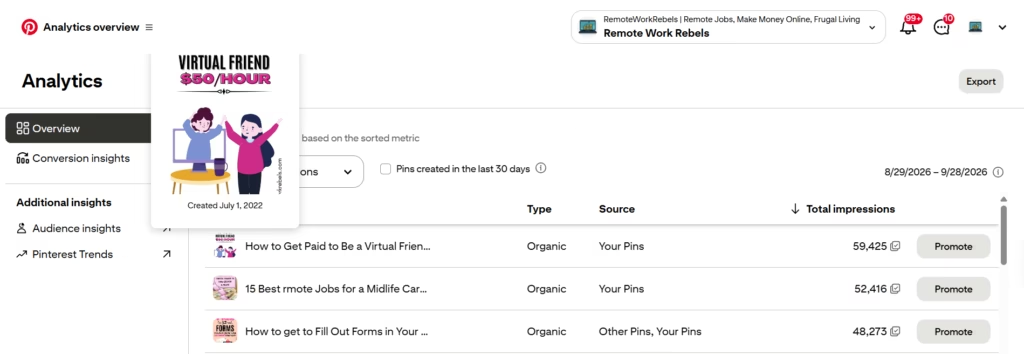
My best pin right now, nearly 60,000 impressions in the last month, was made in July 2022.
It sent 1,196 people to my blog in the past 30 days alone. [I haven’t touched it since.] It’s been quietly working for four years.
None of this happened quickly, and none of it was tidy. Pinterest is a slow build, and even now a good chunk of my pins sink without a ripple.
I once had my account flagged for spam after sharing a pin I hadn’t checked properly. It was an honest mistake, and it still made my stomach drop.
So this isn’t a “sign up and watch the money roll in” post.
But if you think of Pinterest as somewhere to post pretty pictures and hope for likes, you’re using it wrong.
It’s a search engine, and that changes how you should approach it.
Need help getting traffic from Pinterest?
Check out my Pinterest Manager Services HERE.
7 Benefits of Using Pinterest as a Blogger or Business
I’ve spent years on Pinterest, and it still gets written off as a place for recipes and wedding mood boards.
Below are the seven reasons I think it deserves a place in your traffic plan, with my own numbers wherever I have them.
Some are big wins and some come with fine print, and I’ll flag which is which.
1. It’s a Search Engine, Not a Social Network
Most social platforms run on people you already know.
You post, your followers see it, and if you’re lucky someone shares it. Skip a week and the whole thing goes quiet.
Pinterest works the other way round. Nobody opens it to see what their cousin had for lunch.
They open it with a question, or a half-formed idea: how to start a blog, what to cook on Tuesday, how to earn money from the sofa.
That’s search behaviour, and the numbers back it up. Adobe research, cited in Forbes’ piece on Pinterest for small businesses, found that 39% of consumers use Pinterest as a search engine.
Forbes describes its primary purpose as being a visual search engine, which is a fair summary.
The practical consequence is that keywords matter far more than follower count. The words in your pin title, description and board names are what get you found.
Picture someone typing “fun remote jobs” into the search bar. They’re probably not ready to apply for anything yet.
They’re browsing, collecting ideas, saving things for later.
My post on fun remote jobs that are hiring is written for exactly that person, and a pin is a good way to meet them while they’re still in that mood.
Fair warning: if your Pinterest plan is to post a pin and wait for likes, you’re treating it like Instagram. Likes don’t pay anyone. Being found for the right search does.
Takeaway: before you design a single pin, write down the phrase you want it to be found for, then put that phrase in the title.
2. People Arrive Ready to Buy
There’s a difference between someone scrolling for a laugh and someone scrolling for a decision. Pinterest tends to attract the second kind.
People use it to plan things: a kitchen refit, a wedding, a career change, a side hustle.
Planning comes just before spending, which is why the benefits of using Pinterest look so different from what you’d get from a viral tweet.
Forbes cites Sprout Social data saying 85% of weekly users have bought something from a pin. Treat any single statistic with some suspicion, but the direction is hard to ignore.
Pinners are shoppers with a list. For a business with a product catalogue, that means shoppable pins, which let people buy without taking a scenic route via your homepage.
For a blogger, it means readers who arrive wanting to do something, not just read about it.
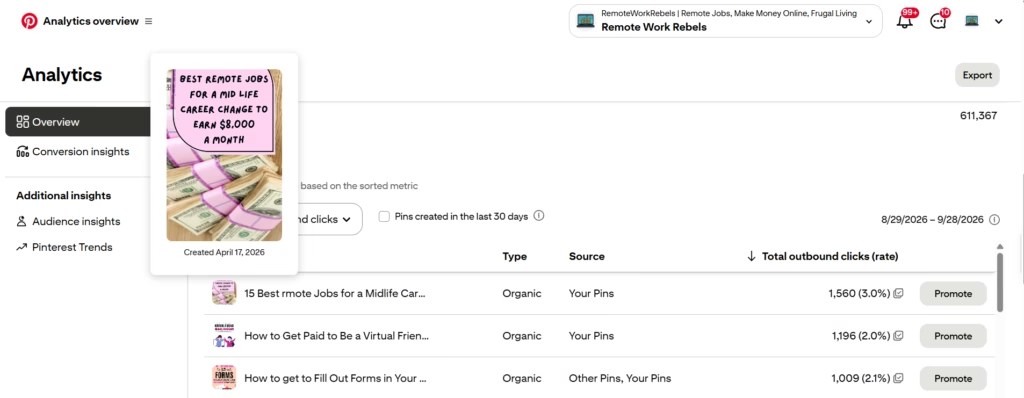
You can see it in my own numbers. My pin for 15 Best Remote Jobs for a Midlife Career got 1,560 outbound clicks in the last 30 days, a 3.0% click rate.
Someone weighing up a career change in their 40s or 50s isn’t casually browsing.
They’re making a big decision and they want a proper list, which is what my post on the best remote jobs for a midlife career change gives them.
Pro tip: send pins to pages you control, such as your own post or product page, and keep any affiliate links there.
You decide what people see when they land, and you’re less likely to trip Pinterest’s spam filters.
3. Pins Last for Months, Even Years
A social media post has a shelf life measured in hours. A Pinterest pin can have one measured in years, and I can show you the receipts.
The pin sitting at the top of my account right now was made in July 2022.
In the last 30 days it picked up 59,425 impressions and sent 1,196 people to my blog, a 2.0% click rate. It’s four years old.
It’s still the top pin on my account for impressions, and it points to my guide on how to get paid to be a virtual friend, which is why that post keeps finding readers long after I stopped thinking about it.
It isn’t a one-off either. My pin about filling out forms for money picked up 1,009 clicks (2.1%) in the same 30 days.
That’s three pins with over a thousand clicks each in one month, working away while I get on with something else.
Forbes makes the same point about evergreen content. Pins that aren’t tied to a season or a trend can keep working all year, and how-to content suits it best.
That matches what I see. My best performers are all “how to” and list posts that will be just as useful next year as they were last year.
The catch: this is the slow part. A pin rarely explodes in week one. Plenty of mine have flopped, and some still do. If you judge Pinterest after a fortnight, you’ll quit before it starts working.
Takeaway: make pins about topics that will still matter in a year, and give each one months to prove itself, not days.
4. You Don’t Need a Following to Get Found
You might assume you need thousands of followers before Pinterest is worth your time.
On most platforms that’s true. The algorithm mostly shows your posts to people who already follow you, so no audience means no reach.
Pinterest is different, and it’s the point about the benefits of using Pinterest that beginners tend to underestimate.
Forbes cites eMarketer data showing that 96% of Pinterest searches are unbranded. In plain English, people aren’t looking for a particular company or creator.
They’re looking for an answer or an idea. Nobody has ever typed “Remote Work Rebels” into Pinterest to find me.
They type things like “morning shift remote jobs” or “entry level remote jobs”, and my pins turn up because the wording matches, not because anyone knows my name.
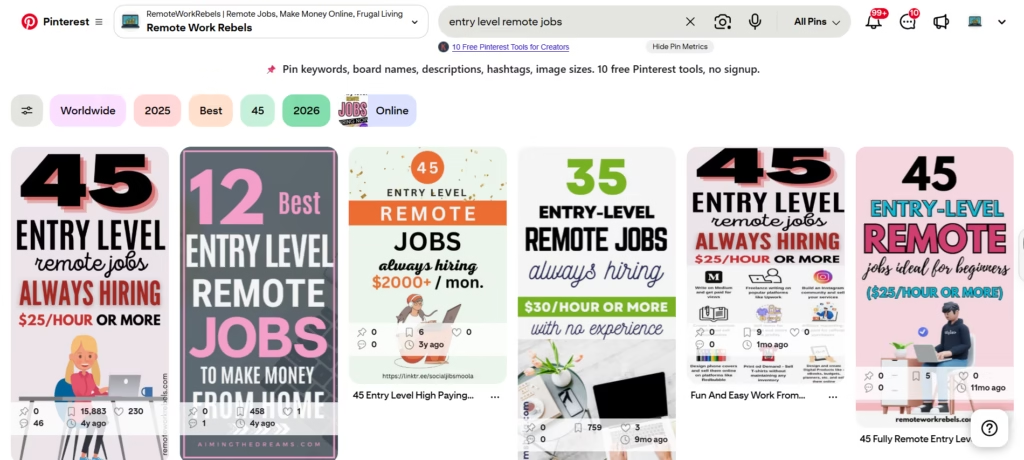
That levels the field. A brand-new blog with a well-worded pin has a fair shot at appearing alongside established sites, because the pin is competing on relevance rather than reputation.
Forbes puts the advice down to a consistent content strategy, not a big name.
Levelling the field isn’t the same as skipping the work, though. You still have to research keywords, design pins that stand out in a crowded feed, and publish regularly for months.
Lots of people give up at week six because nothing has happened yet, which is roughly when nothing was supposed to have happened.
If you’ve tried Instagram or TikTok and got worn down by follower counts, this is the platform that doesn’t care.
Takeaway: put your main keyword at the start of the pin title, then repeat it naturally in the description.
5. It Takes the Pressure Off Google
Relying on one traffic source is like running a business with a single customer. It works nicely until they leave.
For most bloggers that customer is Google, and Google keeps changing the rules.
Forbes points out that organic traffic from Google may be dropping, with more searches ending without a click and AI overviews answering questions before anyone reaches a website.
Pinterest, it argues, can help fill that gap.
My own Analytics tells the same story. In the last 28 days Pinterest sent me over 11,000 sessions across its two source lines.
Google sent 656. To be fair, Google traffic is growing for me, up 174.5% on the previous period, but from a small base, and I’m not planning to build a business on a percentage.
One of the more underrated benefits of using Pinterest is that it gives you a second route to readers that doesn’t depend on ranking on page one.
Pins get found through Pinterest’s own search, the home feed and related pins, which is a completely different set of doors from the ones Google controls.
Now the awkward bit. By my own numbers, I’m heavily reliant on Pinterest, which is a bit rich given the point of this section.
Pinterest can change its algorithm too, and having my account flagged for spam once was a short, sharp reminder that I don’t own the platform.
Takeaway: treat Pinterest as one engine, not the whole car. Check where your traffic comes from every month, and keep building things you own, like an email list.
6. The Tools Are Free (Your Time Isn’t)
Most marketing channels charge you before they give you anything. Pinterest lets you start for nothing.
A business account is free, and among the benefits of using Pinterest for a blog or shop, the price is hard to argue with.
According to Pinterest’s own creators’ guide, the business account is built for creators and brands, and it unlocks special pin formats, the Creator Hub and more detailed analytics.
The same guide suggests connecting and claiming your website. Forbes adds rich pins to the list.
These pull information from your website and are more informative than regular pins, which gives you more room to use keywords and stand out in search results.
The analytics are where the free tools earn their keep. Here’s a habit I’d recommend. When I sorted my top pins by impressions, my 2022 pin came first.
When I sorted them by outbound clicks, my midlife career pin came out ahead, with 1,560 clicks against 1,196.
Impressions are nice for the ego. Clicks bring the readers.
Pro tip: in Pinterest Analytics, change the “Sort by” menu on your Top Pins list to outbound clicks. It shows you which pins are earning their place.
The honest trade-off is that free in money terms doesn’t mean free in time.
Designing pins, writing descriptions and checking what’s working takes hours every week, and the results are slow.
You’re paying with patience instead of cash. For most people starting out, that’s a better deal, but it’s still a deal.
7. The Audience Is Wider Than You’d Think
If you’ve written Pinterest off as a place for wedding boards and wallpaper ideas, the audience has moved on from that image.
Forbes points to a Pinterest report showing that men make up more than a third of the platform’s global audience, skewing towards Gen Z and millennials, with interests in fitness, style, wellness and self-care.
The geography is wider than most people assume too.
My Analytics for the last seven days shows 2.5K active users from the United States, followed by India (171), Singapore (137), Hong Kong (92) and Canada (86).
The UK comes sixth with 65, level with South Africa. I write from Norwich and my home country barely makes the top five, which is humbling in a useful way.
For a remote work blog, a global audience is the whole point. Remote work isn’t tied to a postcode, and neither are the people looking for it.
Pinterest lets a small blog be discovered by someone in Singapore without a marketing budget, a translator or a lucky break.
And if you take to it, it can become a job in itself.
Businesses hire people to run their Pinterest accounts, which I covered in my guide to Pinterest remote jobs.
You can also check out my Pinterest Manager Services if you need help to get your blog or business seen.
Takeaway: don’t assume who your audience is from the stereotype. Open Audience Insights in Pinterest Analytics and check who’s actually engaging with your pins.
So, Is Pinterest Worth It?
For me, yes, and the Analytics screenshot is the argument. But the benefits of using Pinterest come with strings attached.
It’s slow, plenty of your pins will flop, and one careless share can get your account flagged. I know because I’ve done all three.
If you want a starting point, keep it small. Set up a free business account, pick one blog post you’re proud of, and make a pin with the search phrase in the title.
Then make another next week, and the week after. Check your outbound clicks in a month, then again in three. Don’t judge it any sooner than that.
Some of those pins will do nothing. One of them might still be sending readers and/or buyers in 2030.
Need Help With Pinterest?
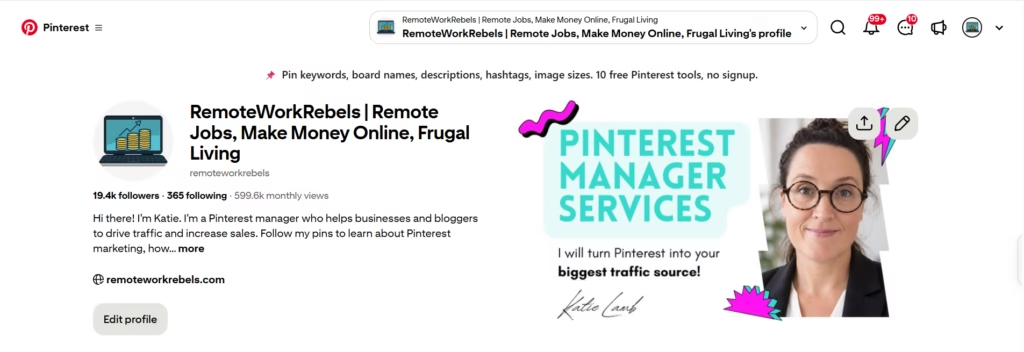
Everything above works, but it also takes time, and time is what most bloggers and small business owners are short of.
There’s keyword research, pin design, writing descriptions, scheduling and checking analytics, then doing it all again next week, for months.
That’s a lot of admin before Pinterest starts paying you back.
If you’d rather hand it over to someone who has already been through the slow start, the flops and the spam flag, that’s what I do.
I’m a Pinterest manager for bloggers and small businesses, and you can see how I work and get in touch on my Hire Me page.
No pressure either way. If you’d rather do it yourself, the steps above are all you need to get started.
Learn More About My Pinterest Manager Services.
Need help now?
Shoot me an email via my Contact Page.